Introduction
Part 1 covered table-level locks, which every statement takes and which DDL takes in strong forms. It ended on the observation that ROW EXCLUSIVE, the table lock taken by INSERT, UPDATE, and DELETE, does not conflict with itself. Any number of transactions can write to a table at the same time. Something else has to stop two of them from writing the same row.
That something is the row-level lock. Row locks are the locks application code takes most often on purpose, usually as SELECT ... FOR UPDATE, and the ones most often taken in the wrong strength. A lock that is stronger than the operation needs blocks work that could have proceeded, and the block is invisible until a foreign key insert starts timing out.
This part covers the four row-level modes, which statements take them automatically, how they conflict, and why two exclusive modes exist. It then covers the wait policies NOWAIT and SKIP LOCKED, locking through a join, deadlocks, and what a row lock wait looks like from the inside. It ends with page-level locks, which need one section and no more.
Four modes
Row-level locks coordinate transactions that want to write or lock the same row. They never block readers. A plain SELECT returns the committed version of a row regardless of who has it locked, because MVCC serves readers from snapshots rather than from locks.
| Mode | Taken automatically by | Explicit clause |
|---|---|---|
FOR KEY SHARE |
Foreign key checks when inserting or updating a referencing row | SELECT ... FOR KEY SHARE |
FOR SHARE |
Nothing | SELECT ... FOR SHARE |
FOR NO KEY UPDATE |
UPDATE that does not change key columns |
SELECT ... FOR NO KEY UPDATE |
FOR UPDATE |
DELETE, and UPDATE that changes key columns |
SELECT ... FOR UPDATE |
Key columns are columns covered by a unique index that a foreign key could reference, which means primary keys and UNIQUE constraints, but not partial or expression indexes. The rule applies whether or not any foreign key actually references the table.
Unlike the table-level matrix, the row-level conflict matrix does form a ladder:
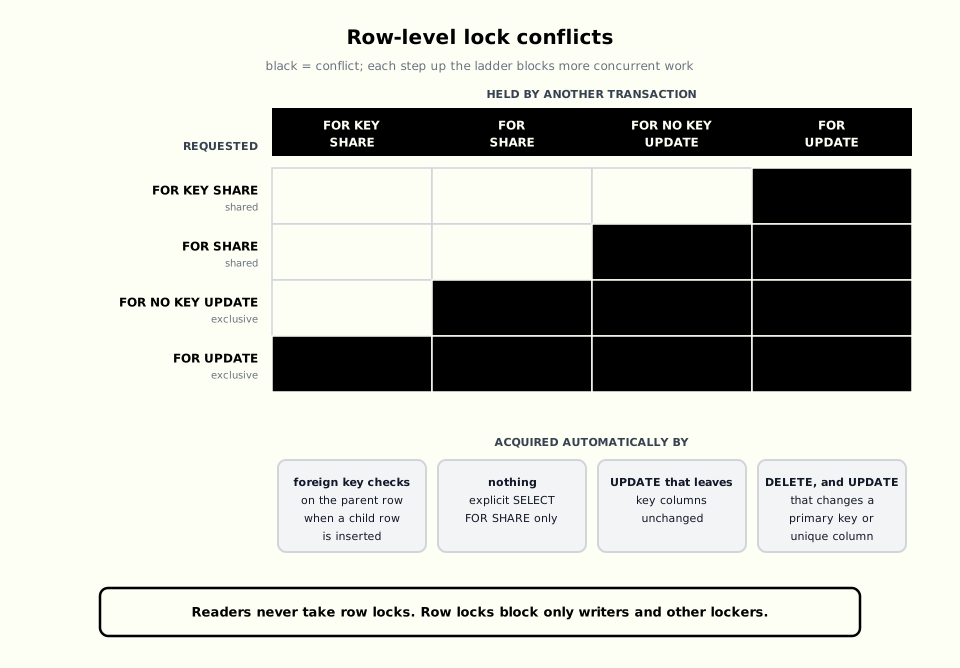
Two of the modes are exclusive and two are shared. FOR UPDATE and FOR NO KEY UPDATE differ only in whether they block FOR KEY SHARE. FOR SHARE and FOR KEY SHARE differ only in whether they block FOR NO KEY UPDATE.
Row locks are stored differently from table locks. A table lock is an entry in a shared memory lock table. A row lock is written into the row’s own tuple header on disk, in the xmax field and its flag bits. Three consequences follow:
- There is no limit on how many rows a transaction can lock. Row locks do not consume
max_locks_per_transactionmemory. - Locking a row costs a write.
SELECT ... FOR UPDATEon a million rows dirties every page those rows live on and generates WAL for each of them. - Held row locks normally do not appear in
pg_locks. A transaction waiting for a row appears there as waiting for thetransactionidof the transaction that holds it.
Why two exclusive modes exist
The split between FOR UPDATE and FOR NO KEY UPDATE exists for foreign keys. When a transaction inserts an order_items row that references orders.id = 42, PostgreSQL must guarantee that order 42 still exists when the insert commits. It does this by taking FOR KEY SHARE on the order row, which blocks only a concurrent DELETE or key change on that row.
If an UPDATE to an order’s status took FOR UPDATE, every insert into order_items for that order would wait for it. Because a status update only takes FOR NO KEY UPDATE, the two proceed concurrently:
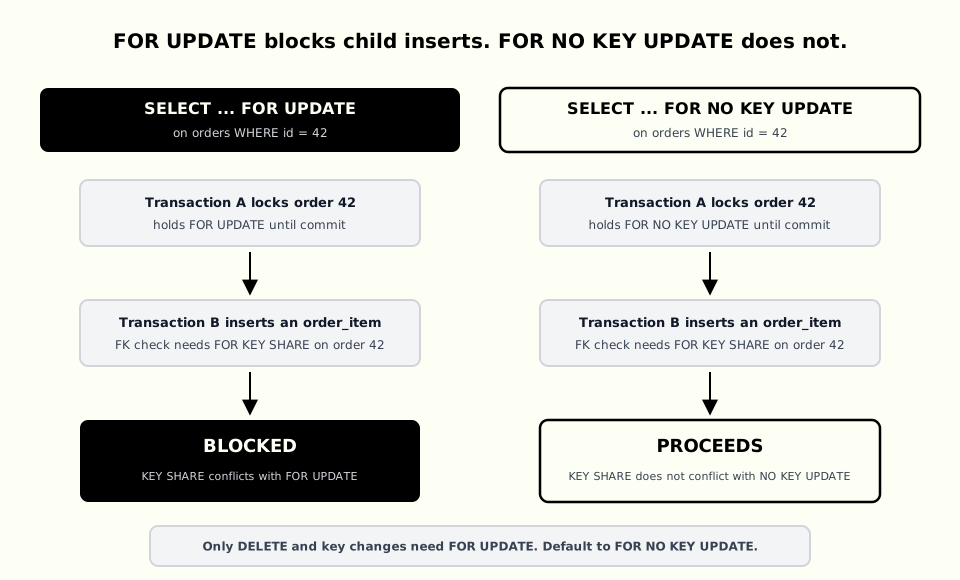
UPDATE and DELETE choose the right mode on their own. The problem appears with explicit locking, because SELECT ... FOR UPDATE is what everyone reaches for. Locking an order row FOR UPDATE to change its status blocks inserts of its line items for the duration of the transaction, for no benefit.
The rule is simple. Use FOR NO KEY UPDATE when the transaction will update non-key columns. Use FOR UPDATE only when it will delete the row or change its primary key or unique columns:
BEGIN;

SELECT id, status
FROM orders
WHERE id = 42
FOR NO KEY UPDATE;

UPDATE orders
SET status = 'paid'
WHERE id = 42;

COMMIT;
In Drizzle, the lock strength is an argument to .for():
const [order] = await tx
  .select({ id: orders.id, status: orders.status })
  .from(orders)
  .where(eq(orders.id, orderId))
  .for("no key update");
The shared modes are less common. FOR SHARE says “nobody may change this row while I decide, but others may make the same promise.” It fits a read-only validation that must hold until commit, such as checking that a parent account is active before inserting a transaction against it. FOR KEY SHARE is the weakest lock, and is mostly useful to understand what foreign key checks are doing.
Wait policies: NOWAIT and SKIP LOCKED
By default a locking SELECT waits for conflicting locks. Two clauses change that.
NOWAIT raises an error immediately if any selected row is locked:
SELECT id, status
FROM seats
WHERE id = 123
FOR NO KEY UPDATE NOWAIT;
ERROR: could not obtain lock on row in relation "seats"
SQLSTATE 55P03lock_timeout achieves the same with a bounded wait instead of none. Both suit interactive requests where a user is waiting and a fast conflict response beats a slow success.
SKIP LOCKED silently leaves out rows that are locked and returns the rest. It turns a table into a work queue:
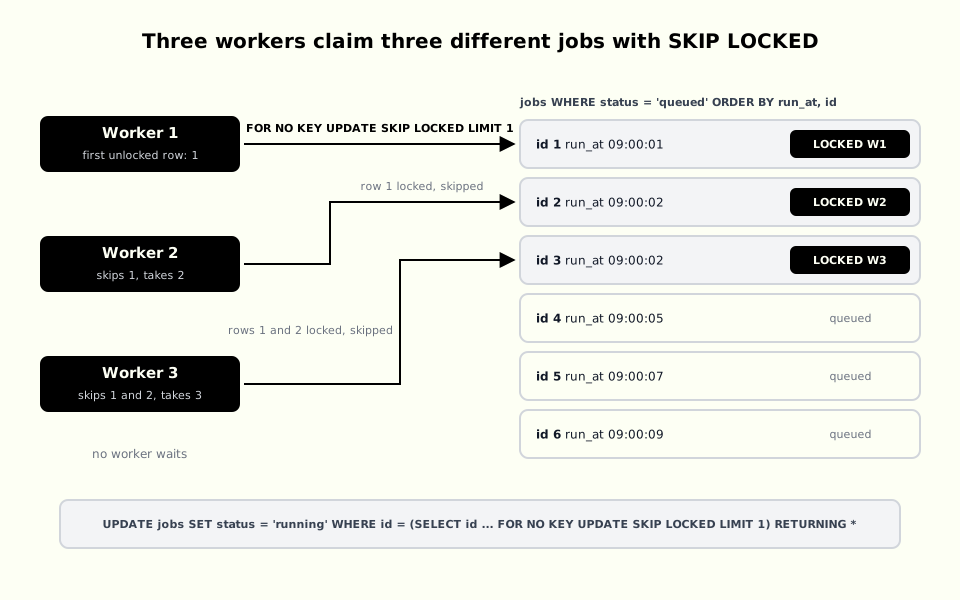
The canonical dequeue statement claims one job in a single round trip:
UPDATE jobs
SET
    status = 'running',
    locked_by = $1,
    locked_at = now()
WHERE id = (
    SELECT id
    FROM jobs
    WHERE status = 'queued'
      AND run_at <= now()
    ORDER BY run_at, id
    FOR NO KEY UPDATE SKIP LOCKED
    LIMIT 1
)
RETURNING *;
Each worker locks a different row without any coordination between workers, and no worker ever waits. Without SKIP LOCKED, every worker would select the same first row and all but one would block on it.
FOR NO KEY UPDATE is sufficient for the claim itself because it changes only non-key columns. Use FOR UPDATE if the same transaction will delete the job or change one of its key columns before committing.
A row lock only lasts for the transaction, so the worker must decide where the transaction ends. Committing the claim and processing the job afterwards releases the lock quickly, but requires locked_at and a lease timeout so a crashed worker’s job is eventually reclaimed. Holding the transaction open while processing makes a crash release the job automatically, at the cost of a long transaction and a held connection. The lease model scales better. The held-lock model is simpler when jobs are short.
Locking rows through a join
A locking clause applies to every table in the FROM list unless told otherwise:
SELECT o.id, c.credit_limit
FROM orders o
JOIN customers c ON c.id = o.customer_id
WHERE o.id = 42
FOR NO KEY UPDATE OF o;
Without OF o, the statement also locks the customer row. That is occasionally what you want and frequently a source of contention nobody can explain, because the lock is on a table the transaction never updates.
Deadlocks between row locks
Deadlocks do not require explicit locking. Two transactions that update rows 1 and 2 in opposite orders deadlock with plain UPDATE statements. PostgreSQL notices after deadlock_timeout, one second by default, and aborts one of them:
ERROR:  deadlock detected
SQLSTATE 40P01
The fix is ordering. When a transaction locks several rows, lock them in a consistent order, usually by primary key. A locking SELECT with ORDER BY id does this directly. An UPDATE ... WHERE id IN (...) does not, because the executor visits rows in whatever order the plan produces. Lock the rows with an ordered SELECT ... FOR NO KEY UPDATE first, then update them.
When a deadlock error does occur, retry the whole transaction from the beginning. The aborted transaction’s earlier reads are no longer trustworthy.
How a waiter waits
When transaction B wants a row that transaction A has locked, PostgreSQL does not spin on the tuple. B takes a short heavyweight lock on the tuple, which appears in pg_locks with locktype = 'tuple' and serves as a place in line. B then waits for A’s transaction ID, which appears as a transactionid lock with granted = false. When A commits or rolls back, its transaction ID lock is released and B wakes.
This is why a row lock wait looks indirect in pg_locks. The blocked process waits on a transaction, not on a row. pg_blocking_pids() resolves the chain for you, and Part 3 shows the queries to use.
When several transactions hold shared locks on one row, PostgreSQL cannot fit all their IDs in the tuple header. It allocates a MultiXact ID that refers to the set and stores that instead. Heavy FOR SHARE or FOR KEY SHARE traffic on a single hot row therefore has a small extra cost that FOR UPDATE on the same row does not.
Page-level locks
Page-level locks protect a table page in the shared buffer pool while a row is read from it or written to it. They come in share and exclusive variants and are released as soon as the row operation completes, not at the end of the transaction.
Nothing in SQL requests, releases, or configures them. They are listed here for completeness. Do not confuse them with BufferContent lightweight-lock waits, which report contention while accessing data pages in memory. Those waits can arise on extremely hot pages, such as the rightmost leaf of a B-tree index on a sequential key under heavy insert load.
What to take from this part
Row locks never block readers, only writers and other lockers. Take the weakest mode that excludes what you must exclude, which for most application code means FOR NO KEY UPDATE rather than FOR UPDATE. Add OF table when locking through a join, lock several rows in a consistent order, and pick a wait policy on purpose: wait, fail fast with NOWAIT or lock_timeout, or move on with SKIP LOCKED.
Table locks and row locks both protect things that exist in the database. The final part covers advisory locks, which protect things that do not, then brings the whole series together with criteria for choosing a lock and the queries for seeing locks in production. Continue with Part 3: Advisory Locks and Choosing the Right Lock.